
A Bone to Pick
Posted: 2014-07-28 Filed under: General, WPF Leave a comment
Although I’ve been doing a lot besides making models over the past month, I just thought I’d share this bit of skeleton with a working rib-cage. I’ve actually been working a bit on the targeting process, and will post some images of that in a bit, just want to make sure the auto-aiming of pre-selected attack targets is where I want it to be.
Skeleton Model
Posted: 2014-07-02 Filed under: Guildsmanship, WPF Leave a commentOK, no rib-cage yet, so I threw some kind of leather armor over him…


better render
He’s mostly the result of testing out parameterized fragments, with a little bit of the skeleton face and head I produced a month or so ago. Working with Skeley has helped me fine-tune some things in model construction and see where some impedance barriers to smooth asset creation are.
The second picture is direct from the model editor, where the field of view is apparently slightly better. I also made it possible to swap roll and yaw axes on fragment nodes, so I could more easily roll the sword (which is oriented so that it rolls around the z Axis instead of the Y axis)
Also, he keeps me from working more on the targeting system in the client…
Heavily Nested MarkupExtensions
Posted: 2014-06-26 Filed under: Coding, WPF Leave a comment
<GeometryModel3D Material="{uzi:VisualEffectMaterial Key=Arm, VisualEffect={uzi:SenseEffectExtension}}"
                 Geometry="{uzi:CylinderMesh CacheKey=1,
                 P1={uzi:Point3DVal Z={uzi:DoubleSum A={uzi:DoubleProduct A={uzi:DoubleVal Key=Length,Value=0.75, MinValue=0.1, MaxValue=1.5}, B=-1}, B=-0.09}},
                 P2={uzi:Point3DVal Z=0.16},
                 Diameter={uzi:DoubleVal Key=Diameter,Value=0.4, MinValue=0.05, MaxValue=1.0},
                 ThetaDiv={uzi:IntVal Key=Theta,Value=16, MinValue=8, MaxValue=20},
                 BaseCap=true,TopCap=true}">
</GeometryModel3D>
This is a bit of the part for an Arm model fragment. I use a lot of markup extensions to get the GeometryModel3D to be flexible enough for composition and environment shading.
First, the Material is a VisualEffectMaterial, which uses the Key to work with the Meta-Model system to figure out which texture to apply. The VisualEffect is mapped to the standard SenseEffectExtension, so that creature senses can be applied at render time.
The next big piece is the CylinderMesh used to provide the Geometry. This uses the HelixToolkit’s MeshBuilder to define parameters for creating a cylinder mesh. The Point3DVals are extensions to defined points (obviously), and the DoubleVals and IntVals define parameters that can be overriden when composing in a MetaModel. Lastly, the DoubleProduct (there’s also a DoubleSum) define mathematical functions on DoubleVals so that a same parameter can be re-used in multiple places as a factor (or sum) of other values.
3D Bladed Weapons
Posted: 2014-06-15 Filed under: General, WPF Leave a comment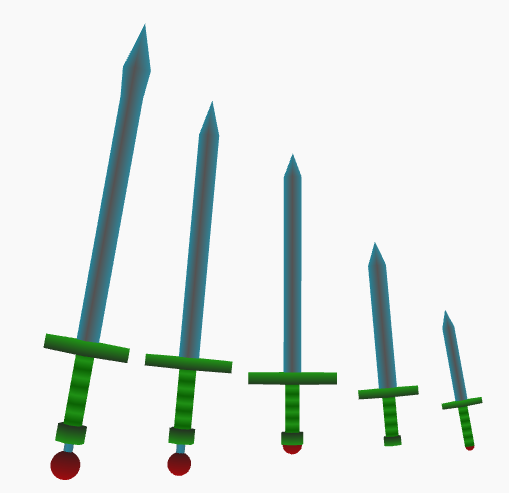
Great Sword to Dagger
From left to right, Greatsword, Bastard sword, longsword, short sword and dagger. They’re all using the same coloring schemes so only the sizes and parts vary.
Warhammer!
Posted: 2014-06-15 Filed under: General, WPF Leave a comment
Workshop Render of Warhammer Fragment
Even though I’ve had the warhammer model fragment for awhile, I still think it looks pretty cool when properly painted with gradient materials. I was tightening up some of the other content tools, and also finished the 3D models fragments for the great sword, bastard sword, dart and javelin, as well as tightened up the long sword now that the great sword and bastard sword are around for comparison.
If I feel so inclined I’ll add images of some of them as well.
Zombies
Posted: 2014-06-05 Filed under: Guildsmanship | Tags: zombie Leave a commentSince I spent so much time on skeletons and traits over the past few weeks, I had hoped to get some benefit out of all that work when applying it to zombies. Apparently I did: took me about 45 minutes to add basic zombie support. There are still some things missing (zombies get single actions only, but I believe I mostly implemented something for this already), I’m not entirely satisfied with my way of “cloning” the flight movement and making its maneuverability rating “clumsy”. Also, I need to put some constraints on applying replacement creature templates, and some standard processes for replacing the in-map locator token and the token model.
Right now, there’s nothing preventing an animated object from being made a zombie or skeleton, nor from a zombie or skeleton being made a zombie or skeleton! There’s also a little bit of fuzz to work out on zombies that are based on creatures with partial power dice; but all in all, a good start to my dabble in virtual necromancy.
Mugshots of the Undead
Posted: 2014-06-02 Filed under: General Leave a comment
general skeleton

Gargoyle skeleton face

first zombie face

slightly more dead zombie
All thanks to my face creator program…
The Skeleton Key
Posted: 2014-06-02 Filed under: Uncategorized Leave a commentFinally got to test “skeletonizing” creatures. First a human, then with a gargoyle (I use both). For those of you that have been following me (ha ha, I jest!), you are well aware of how much I like the gargoyle as a test bed creature. It has monster levels (and can increase in size by number of power dice), it can advance by character class, it has extra natural weapons slots, it can fly, has darkvision, magic damage reduction, etc. So it also makes a good skeleton (and soon: zombie) test bed due to the the plethora of traits and things associated with replacing it.
Skeletons and zombies are handled by creating entirely new creatures whose skeleton/zombie species is based on the original creature, and the workshop command performs the tasks of removing the game token for the original creature and adding the one for the replacement creature (currently using the same model). Skeletal gargoyles get more power dice than human skeletons, and they have bite and gore attacks. They cannot fly and lose the DR/10 magic (though get DR/5 bludgeoning).
I had to fix some things (of course, that’s what debugging is all about) and have a few more tweaks to do: namely make an item slot trait to get around an ugly kludge for dealing with extra item slots (gore and bite, for instance) currently defined by the species body generator and not in the body constructor itself.
Refactoring Retreat
Posted: 2014-05-29 Filed under: Uncategorized Leave a commentJust finished my third (and hopefully final for this year) road-trip to Atlanta and back. Flights were crazy expensive over Memorial Weekend, so I opted to take a day off work and drive my daughter to her drum corps camp. While there, I followed my usual practice of major refactoring (since I’ve got little else to do on Saturday).
Amongst the things I accomplished:
- defined a MagicAugment adjunct for enhancing weapons and armor, replacing a rather loosely defined “IsDependent” property of base adjuncts
- allowed natural weapons to be augmented (and included ability to have +0 augmentation to overcome damage reduction)
- excluded species from the species selection list if the constructor has arguments (such as a Skeleton, which needs a source creature to work)
- fixed some icons on menus by going through the resource manager instead of directly at the package
- Traits became adjuncts
- changed some magic-styles back to match OGL names
- created an UndeadClass
- defined BaseMonsterClass as an IPowerClass (so it can source powers)
- removed GetTraits (which just enumerated strings)
- did some housecleaning on power classes and fractional power dice
- defined body cloning (for skeleton/zombie at the very least)
Since I got back, I did a few more things:
- refactored PowerDefs and PowerSources (and their interfaces) to have non-action oriented versions in support of qualities that do not have actions associated with them (think: magical damage reduction). My goal here is to get all power sources running as adjuncts so that anti-magic fields (and such) can shut down everything magical without having to write tons of specialized code
- made the PickUpHandler check load limits
Next:
Finish equipment and natural weapon transfer for skeleton, follow similar pattern for zombie (possibly generalize).
Creature Templates
Posted: 2014-05-19 Filed under: Guildsmanship Leave a commentReading the SRD, one might think there are only two types of creature templates (changes that can be applied to a creature to make it more powerful). These are: acquired and inherited templates.
Acquired templates are supposed to be templates that are added to a creature well after it has acted as a a non-templated version of the creature, and includes such things as lycanthropes (were-wolves, were-rats, etc), ghosts, zombies, skeletons, liches and vampires.
Inherited templates are supposed to be templates that are part of the creature make-up from the beginning, such as fiendish, celestial, half-fiend, half-celestial and half-dragon (but which may also include lycanthropes!)
When attempting to program these, I can identify four semi-distinct categories:
Altered Species
Fiendish, half-fiend, celestial, half-celestial and half-dragon fall into this category. Typically used for creatures that do not progress by character class (or have some progression with “racial power dice”). Rather than use the standard species traits and progressions, the altered progressions and traits are used instead.
Replacement Creature
Ghost, skeleton and zombie fall into this category. There is a base creature instance which is used to build out the replacement creature. The original creature needs to be tracked in case the template is removed (that is, the condition that made the replacement creature is undone).
Replacement Creature with Advancement Alterations
Liches and vampires use this style. The base creature instance is used to build a replacement creature, but the creature can advance in character class. Any subsequent character class advancement may be altered from its normal class features (typically power dice size), but also may include strengths of special powers such as spell resistance.
Advancement Class Analog
Lycanthropes gain a number of “racial power dice” indicated by the type of lycanthropy. These act like a character class, but care needs to be taken in removing the “affliction” (class and power dice) since it is possible to advance in character class level after gaining the “affliction”.
 sageikosa